Qwerto: Fix Typing Mistakes and Convert Text to Logical Sentences
Qwerto is a free Chrome add-on developed by Lotan Sartel. It falls under the category of Browsers and specifically the subcategory of Add-ons & Tools. With Qwerto, users can easily fix typing mistakes in English and convert them to their desired language, resulting in logical sentences.
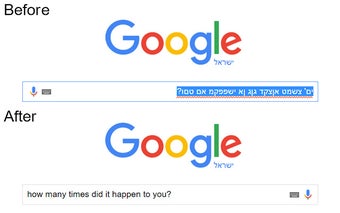
One common frustration when writing in a language different from our keyboard settings is ending up with a mix of letters that make no sense. Qwerto solves this problem by allowing users to reverse the text to the intended language with a simple shortcut. By tapping Ctrl + Q or using a personal shortcut, users can quickly correct their typing mistakes and ensure their writing is coherent and accurate.
Qwerto currently supports 12 new languages, including Hebrew, Arabic, Czech, German, Greek, French, Portuguese, Spanish, Russian, Romanian, Turkish, and Kazakh. Users can enjoy seamless communication in these languages and expect more languages to be added in future versions.
Qwerto is a handy tool for anyone who frequently types in different languages and wants to avoid embarrassing typos or nonsensical sentences. It is a valuable addition to the Chrome browser and a time-saving solution for language enthusiasts.